
Aligning Spectra#
This notebook shows how to align spectra before they can be averaged.
We use an observation with a mixed observing strategy; position switching and frequency switching. In this case the on and off source observations also switch the signal in the frequency domain between a signal and a reference state, so there are four switching states: signal with the noise diode, signal without the noise diode, reference with the noise diode and reference without the noise diode.
We will calibrate the signal and reference states independently, using position switching. Then, we’ll look at the calibrated spectra as a function of channel and vizualize the shift between the signal and reference states. Finally we will shift the reference state and average it with the signal state.
Dysh commands#
The following dysh commands are introduced (leaving out all the function arguments):
  filename = dysh_data()
  sdf = GBTFITSLoad()
  sb = sdf.getps()
  ta = sb.timeaverage()
  ta1 = ta.align_to()
  ta.average()
  p1 = ta.plot()
  p1.oshow(ta1)
Loading Modules#
We start by loading the modules we will use for the data reduction.
# These modules are required for the data reduction.
from dysh.fits.gbtfitsload import GBTFITSLoad
from dysh.log import init_logging
from astropy import units as u

# This module is used for custom plotting.
import matplotlib.pyplot as plt

# These modules are used for file I/O
from dysh.util.files import dysh_data
from pathlib import Path
Setup#
dysh uses a logger to communicate. If you are working in the command line, then the logging is setup for you. If you are working in a jupyter lab instance, then you need to set it up. You can do so using the init_logging function imported above. As an argument, init_logging takes a number, the verbosity level. level 0 is for error messages only, 1 for warning, 2 for info and 3 for debug. Here we set it to level 2.
init_logging(2)

# also create a local "output" directory where temporary notebook files can be stored.
output_dir = Path.cwd() / "output"
output_dir.mkdir(exist_ok=True)
Data Retrieval#
Download the example SDFITS data, if necessary.
filename = dysh_data(example="align")
23:03:26.594 I Resolving example=align -> mixed-fs-ps/data/TGBT24B_613_04.raw.vegas.trim.fits
23:03:26.595 I url: http://www.gb.nrao.edu/dysh//example_data/mixed-fs-ps/data/TGBT24B_613_04.raw.vegas.trim.fits
Downloading TGBT24B_613_04.raw.vegas.trim.fits from http://www.gb.nrao.edu/dysh//example_data/mixed-fs-ps/data/TGBT24B_613_04.raw.vegas.trim.fits
23:03:27.001 I Starting download...
23:03:27.475 I Saved TGBT24B_613_04.raw.vegas.trim.fits to TGBT24B_613_04.raw.vegas.trim.fits
Retrieved TGBT24B_613_04.raw.vegas.trim.fits
Data Loading#
Next, we use GBTFITSLoad to load the data, and then its summary method to inspect its contents.
sdf = GBTFITSLoad(filename)
sdf.summary()
| SCAN | OBJECT | VELOCITY | PROC | PROCSEQN | RESTFREQ | # IF | # POL | # INT | # FEED | AZIMUTH | ELEVATION |
|---|---|---|---|---|---|---|---|---|---|---|---|
| 35 | MESSIER32 | -200.0 | OnOff | 1 | 1.420406 | 1 | 1 | 5 | 1 | 73.1155 | 62.2955 |
| 36 | MESSIER32 | -200.0 | OnOff | 2 | 1.420406 | 1 | 1 | 5 | 1 | 72.3087 | 59.3225 |
Data Reduction#
Position Switched Calibration#
We calibrate the signal and reference states independently.
# Signal.
ps_sig = sdf.getps(scan=35, sig="T", ifnum=0, plnum=0, fdnum=0).timeaverage()
# Reference.
ps_ref = sdf.getps(scan=35, sig="F", ifnum=0, plnum=0, fdnum=0).timeaverage()
Plot the signal and reference spectra as a function of channel.
Here we use matplotlib.pyplot (plt) directly, since dysh is still not able to show more than one Spectrum in a plot.
We now have the oshow()
p1 = ps_sig.plot(xaxis_unit="chan")
p1.oshow(ps_ref)
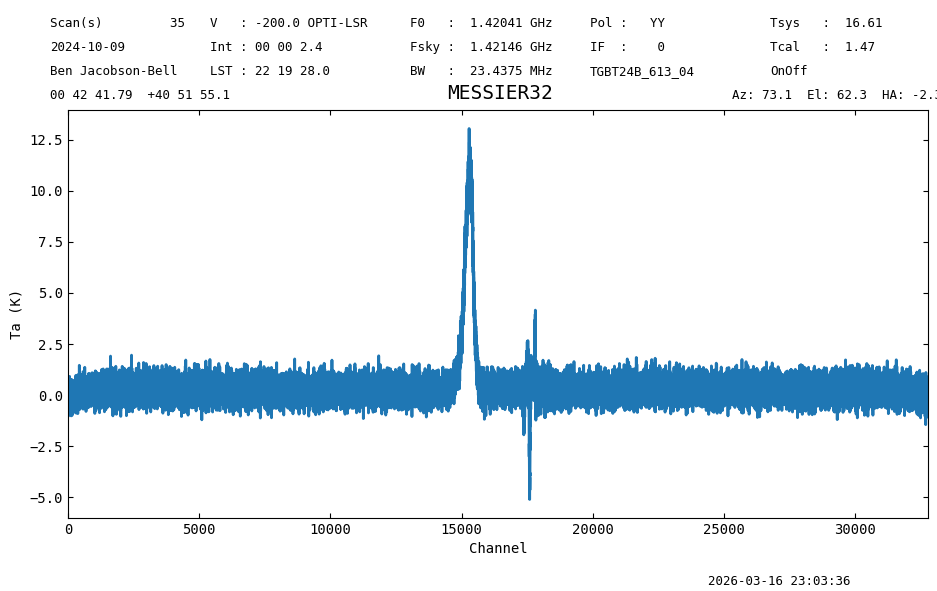
plt.plot(ps_sig.flux, label="sig")
plt.plot(ps_ref.flux, label="ref")
plt.legend() \# Add a legend to display the labels.
\# Set the axis labels.
plt.ylabel(f"Antenna temperature ({ps_sig.flux.unit})")
plt.xlabel("Channel")
plt.show()
Compute the rms in a line-free portion of the spectra.
print(f"Noise on the signal state {ps_sig[5000:10000].stats()['rms']:.2f}")
print(f"Noise on the reference state {ps_ref[5000:10000].stats()['rms']:.2f}")
Noise on the signal state 0.41 K
Noise on the reference state 0.40 K
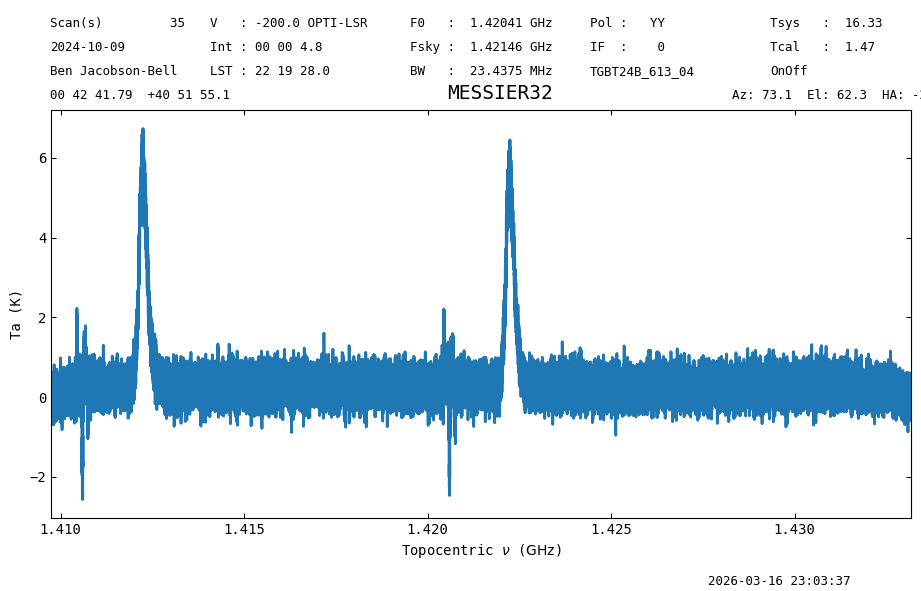
If we were to average the data, then the result would have the spectral line misaligned, since the averaging is done per channel. We can see this if we calibrate the data without separating the signal and reference states. This is less than ideal because the signal gets reduced and the line shows up in two different places even though it is the same line.
ps = sdf.getps(scan=35, fdnum=0, plnum=0, ifnum=0).timeaverage()
ps.plot(xaxis_unit="GHz");
Align Spectra#
Instead, we must align the spectra before averaging. In this case we will shift the reference state spectrum to match the signal state spectrum.
We now have the oshow()
ps_ref_aligned = ps_ref.align_to(ps_sig)
plt.figure()
plt.plot(ps_sig.flux)
plt.plot(ps_ref_aligned.flux)
plt.ylabel(f"Antenna temperature ({ps_sig.flux.unit})")
plt.xlabel("Channel")
plt.show()
p1 = ps_sig.plot(xaxis_unit="chan")
p1.oshow(ps_ref_aligned)
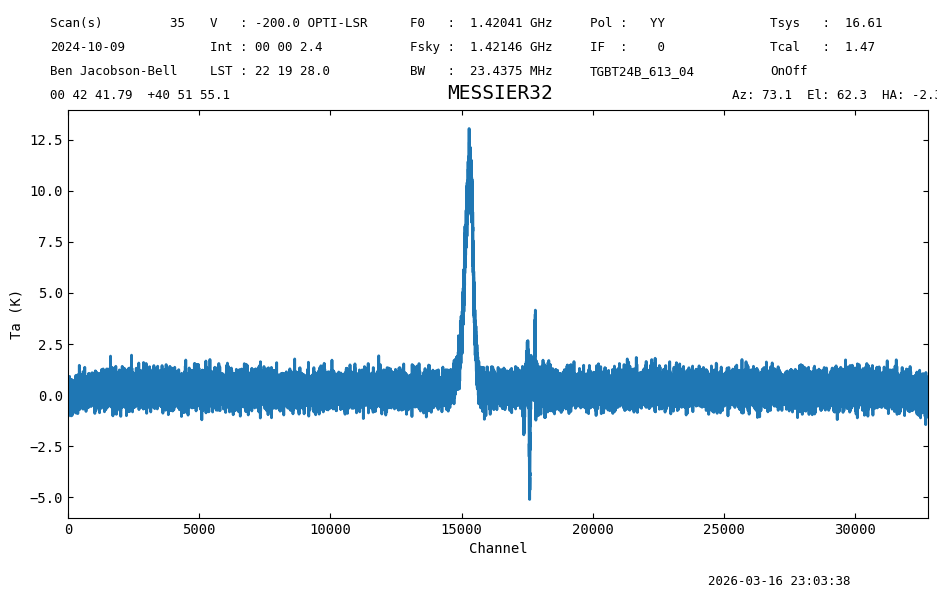
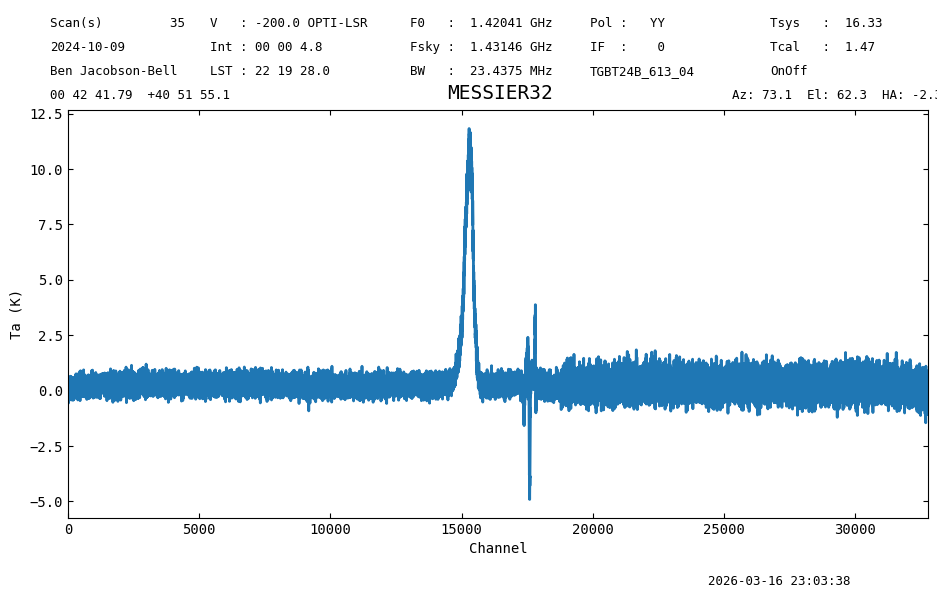
Now the spectra are aligned and can be averaged together.
ps_avg = ps_sig.average(ps_ref_aligned)
ps_avg.plot(xaxis_unit="chan");
print(f"Noise on the average {ps_avg[5000:10000].stats()['rms']:.2f}")
Noise on the average 0.26 K
The resulting spectrum shows only one peak, at the frequency of the line, and the noise is smaller than in the individual states where the spectra overlapped (channels below ~18000). The noise improvement is better than \(\sqrt{2}\) since shifting the reference spectrum for the alignment artificially lowers its noise.
Finally, at the end we compute a fairly meaningless statistic over the whole spectrum, merely as a checksum if the notebook produces the same answer as when it was designed.
Final Stats#
Finally, at the end we compute some statistics over a spectrum, merely as a checksum if the notebook is reproducible.
ps_avg.check_stats(1.03823425 * u.K)
23:03:38.899 I rms is OK