

Managing Requirements#
Say you have a new package called example-package to add as a dependency. Here are the steps to do so properly.
Step 1: Update pyproject.toml#
You first need to add the package to pyproject.toml. Locate the section of the file which lists the dependencies. It should look like this:
dependencies = [
  "httpx",
  "astropy>=6.1",
  "astroquery",
  "ipython",
  "jplephem",
  "matplotlib",
  "numpy<2",
  "pandas",
  "rich",
  "scipy",
  "specutils>=2",
  "tenacity",
]

[project.optional-dependencies]
nb = [
  "jupyter",
  "jupyterlab",
  "ipympl",
  "jupyter-nbextensions-configurator>=0.6.4",
]
all = ["dysh[nb]"]
If the package is needed for
dyshfunctionality, add it to thedependencies = [...]list.If the package is only needed for development, add it to the
dev = [...]list.If the package is needed for notebooks, add it to the
nb = [...]list.
Step 2: Compile requirements.txt#
Using the lowest supported version of Python (currently 3.10), do the following:
 $ cd /path/to/dysh
 $ source /path/to/dysh-venv-py3.10/bin/activate
(dysh-venv-py3.10) $ pip install pip-tools
(dysh-venv-py3.10) $ pip-compile -o requirements.txt pyproject.toml
Step 3: Validate new requirements#
Push these two changed files to GitHub. Then, verify that all GitHub Actions tests pass to ensure that these requirements work for all supported versions of Python and all supported operating systems.
Things that can go wrong#
Alas, problems can arise. Here are a few that have been encountered and solved so far.
Compiling requirements on Windows#
Sometimes, compiling requirements.txt on a Windows machine can result in requirements which fail on the other operating systems. This will result in your GitHub Actions only succeeding on Windows machines, like so:
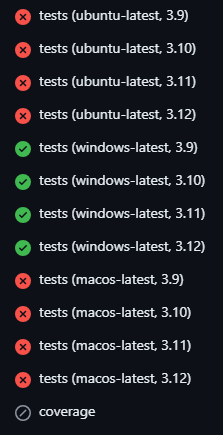
Solution: Compile requirements.txt on a non-Windows machine, like the Linux ones at GBO.
Platform-dependent versions#
Some packages may require different versions for different operating systems. If you cannot resolve a dependency issue another way, there is a solution.
Solution: Pin the versions in the pyproject.toml file, then re-compile the requirements.txt.